Why Back-to-Back Video Calls Exhaust You More at Home
Quick Answer: Home calls exhaust you more because the office supplied transitions you no longer get - the walk between rooms, the incidental conversation, the change of visual scene. Remote calls run back-to-back in one chair, one room, one field of view, while self-view adds continuous self-monitoring and slight audio delays raise cognitive load. Fix it by ending calls at 25 and 50 past, hiding self-view, taking one call in three standing or walking, and changing rooms at least twice a day.
Here is what the office was quietly doing for you, and how to rebuild it.
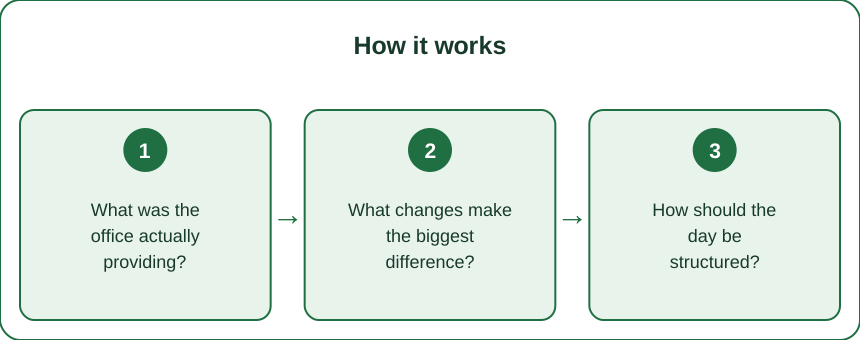
What was the office actually providing?
Transitions between meetings. Walking to another room took two to five minutes and provided a genuine mental reset, movement, and a change of visual field. Remote calls end and begin in the same second.
Different rooms meant different contexts. Your brain uses environmental change to separate tasks, and doing six different meetings in one chair removes that entirely.
Incidental conversation broke the intensity. The thirty seconds of small talk while people settled was a real, if unglamorous, cognitive rest that structured video calls do not include.
Peripheral vision got used. In a room you see people, movement, and space in your periphery; on screen everything is in a small rectangle directly in front of you, which is a narrower and more effortful visual task.
And you moved. Walking between meetings added up to meaningful daily movement, and its removal is one of the largest health differences between office and home work.
Self-view is the genuinely new burden. Seeing yourself continuously prompts ongoing self-monitoring that no in-person meeting involves - and it is the single easiest thing on this list to remove.
What changes make the biggest difference?
End calls at 25 and 50 past the hour. A 5 minute gap between meetings rebuilds the transition the office provided, and it is the highest-value change available. Set it as a default in your calendar.
Hide self-view. Most platforms allow it. Continuous self-monitoring is genuinely tiring, and removing it changes how long calls feel more than people expect.
Take one call in three standing or walking. Camera-off audio calls can be walked, which changes posture, circulation, and mental state at once.
Change rooms at least twice a day. Even moving to a kitchen table for an hour restores some of the context separation that different meeting rooms used to provide.
Fix your audio properly. Poor audio forces continuous effortful listening, and slight delays disrupt the natural rhythm of conversation - both meaningfully raise cognitive load across a day.
Look at something 6 metres away during every break. It relieves the sustained near-focus that six hours of screen work imposes on the eyes.
And question whether every meeting needs video. An audio-only call removes self-monitoring, allows movement, and loses very little for most routine discussions.

How should the day be structured?
Batch calls rather than scattering them. Three hours of meetings and three hours of focused work is far less tiring than six meetings distributed across the whole day, because scattered meetings prevent any deep work between them.
Protect a genuine lunch away from the desk. Eating at the desk between calls provides no recovery at all, and it is the most commonly sacrificed hour of the remote day.
Build a commute substitute. A 10 to 15 minute walk before starting and after finishing provides the transition between work and home that the commute used to, and it improves both the start and the end of the day.
Put the hardest thinking outside the call blocks. Cognitive capacity is lowest immediately after a long meeting run, so scheduling demanding work there wastes it.
Take a proper 15 minute break mid-morning and mid-afternoon, away from all screens. Not a scroll - an actual change of activity.
Turn the camera off for the last meeting of the day where you can. Fatigue is cumulative, and the sixth call is where self-monitoring costs the most.
And decline what you can. The most effective intervention remains fewer meetings, and remote working made adding them frictionless in a way that deserves resistance.
What Nobody Tells You About Remote Meeting Fatigue
Slight audio delay is genuinely tiring. Sub-second delays disrupt conversational turn-taking, and your brain works continuously to compensate. Good connection and good audio hardware are not luxuries.
Gallery view is harder than speaker view. Watching many faces at once means processing many expressions simultaneously, which is more effortful than the single focus a room naturally provides.
Eye contact is impossible and your brain notices. Looking at the camera and looking at faces are different directions, and the mismatch is a low-level cost across every call.
Being on camera is closer to performance than conversation. Sustained visibility triggers a mild ongoing performance state, which is why camera-off calls feel disproportionately restful.
Home lighting matters more than people think. Poor lighting makes everyone strain to read expressions, including yours. A window in front of you does more than any software setting.
Headphone weight adds up over six hours. Lighter is genuinely better on heavy call days, even at some cost to sound quality.
And the fatigue is real rather than a failure of stamina. Naming it accurately is the first step to restructuring the day rather than assuming you should simply cope better.
FAQ: Video Call Fatigue at Home, Answered
Why are home video calls more tiring than office meetings?
Because the office supplied transitions, movement, context changes, and incidental conversation. Remote calls run back-to-back in one chair, one room, and one narrow field of view.
What is the single best change?
End calls at 25 and 50 past the hour. A 5 minute gap rebuilds the transition the office used to provide, and it costs almost nothing.
Does hiding self-view help?
Substantially. Continuous self-monitoring is genuinely tiring and has no in-person equivalent, and removing it is free.
Should I batch meetings or spread them out?
Batch them. Scattered meetings prevent focused work between them, so the same number of calls costs far more of the day.
Do I need video for every call?
No, and audio-only calls remove self-monitoring, allow walking, and lose very little for routine discussions.
Why does bad audio make me so tired?
Because poor sound forces continuous effortful listening, and sub-second delays disrupt conversational rhythm in a way your brain works constantly to compensate for.
What should I do between calls?
Stand, look at something 6 metres away, and move. A 15 minute screen-free break mid-morning and mid-afternoon does more than several short glances at a phone.
TL;DR:
- The office supplied transitions - walking, context change, incidental conversation. Remote calls removed all three.
- End calls at 25 and 50 past. A 5 minute gap is the highest-value fix available.
- Hide self-view. Continuous self-monitoring has no in-person equivalent and is genuinely tiring.
- One call in three standing or walking, and change rooms at least twice a day.
- Fix the audio. Poor sound and sub-second delays raise cognitive load all day.
- Batch meetings rather than scattering them, and protect a real lunch away from the desk.
- Build a commute substitute - 10 to 15 minutes of walking at each end of the day.
The fatigue is structural, not a stamina failure. Restructure the day rather than trying to cope harder.
Keep Reading
This article is for general informational and styling purposes only. Fit, sizing, and product availability may vary.